 uarkova
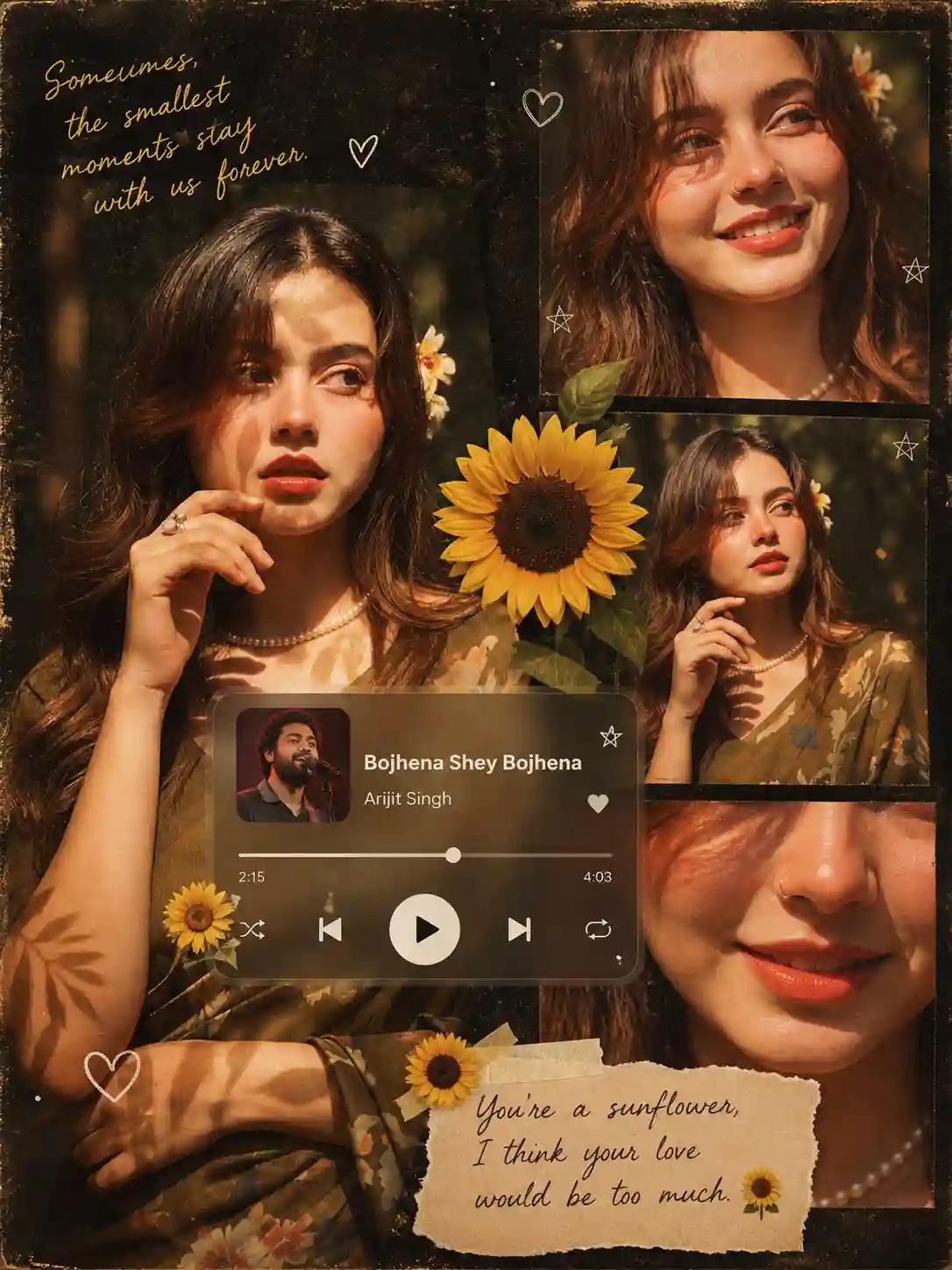
How to Create a Retro Vintage Collage Photo Using ChatGPT (Step-by-Step Guide)
If you’ve ever seen those aesthetic Pinterest-style collage photos with warm lighting, vintage vibes, and music player overlays—this guide is exactly what you need. In this blog, I’ll show you step-by-step how to use ChatGPT to generate a stunning AI collage image, even if you’re a complete beginner.
🎯 What You’ll Create
By the end of this guide, you’ll be able to generate:
-
A retro vintage collage
-
Multiple photos of the same person
-
Aesthetic overlays like music player, text, flowers
-
A professional 4K image ready for Instagram or Pinterest
🧠 Step 1: Open ChatGPT
Go to ChatGPT and make sure you’re using the image generation feature (GPT-4o or similar).
👉 Important:
You need to upload a reference image (your face or any subject) to maintain identity consistency.
🖼️ Step 2: Upload Your Image
-
Click the Upload Image button
-
Select your photo
-
Make sure the face is clear and visible
💡 Tip: Good lighting = better results
✍️ Step 3: Use the Prompt
Now comes the most important part — the prompt.
Scroll down 👇 copy the prompt, and paste it into ChatGPT.
⚡ Step 4: Generate the Image
-
Paste the prompt
-
Change your song name and artist name
-
Click Generate
-
Wait a few seconds
🎉 Boom! Your AI collage is ready.
🔧 Step 5: Fix Common Issues
If your image isn’t perfect, try this:
❌ Face looks different
✅ Add: “same face, identical facial features across all images”
❌ Too dark or dull
✅ Add: “bright warm golden lighting”
❌ Details missing
✅ Add: “ultra detailed, high quality, sharp focus”

Create an ultra-high-resolution retro-vintage collage featuring four portraits of the uploaded photo SAME young woman (strict identity consistency across all images) same face, identical facial features across all frames.</p>
<p>STYLE & MOOD:<br>Warm golden-hour lighting, cinematic tones, soft film grain, and a nostalgic scrapbook aesthetic. Use deep earthy colors like burnt orange, olive green, and muted gold. Add a slightly faded, textured vintage look.</p>
<p>LAYOUT:</p>
<p>LEFT SIDE (Main Portrait):</p>
<ul>
<li>
<p>Large vertical portrait</p>
</li>
<li>
<p>Woman wearing a traditional floral outfit (olive/brown tone)</p>
</li>
<li>
<p>Small nose ring visible</p>
</li>
<li>
<p>Soft sunlight on face with leaf shadow patterns</p>
</li>
</ul>
<p>RIGHT SIDE (3 Portraits stacked):</p>
<ol>
<li>
<p>Top Right: Close-up smiling portrait (soft natural expression)</p>
</li>
<li>
<p>Middle Right: Relaxed pose looking slightly off-camera</p>
</li>
<li>
<p>Bottom Right: Extreme close-up focusing on lips/smile</p>
</li>
</ol>
<p>BACKGROUND:<br>Dark textured background like old scrapbook paper with grain and worn edges</p>
<p> OVERLAYS:</p>
<ol>
<li>
<p>Music Player UI (semi-transparent glass effect, centered):</p>
<ul>
<li>
<p>Album art: photo of Artist</p>
</li>
<li>
<p>Track: "Bojhena Shey Bojhena"</p>
</li>
<li>
<p>Artist: "Arijit Singh"</p>
</li>
<li>
<p>Progress bar: 2:15 / 4:03</p>
</li>
<li>
<p>Controls: play, skip, shuffle, heart icon</p>
</li>
</ul>
</li>
</ol>
<p>DECORATIONS:</p>
<ul>
<li>
<p>One large sunflower (center-right)</p>
</li>
<li>
<p>Two small sunflowers around music player and text</p>
</li>
<li>
<p>Small white doodles (hearts and stars)</p>
</li>
</ul>
<p>TEXT ELEMENTS:</p>
<p>Top Left (gold handwritten/script font):<br>"Sometimes, the smallest moments stay with us forever."</p>
<ul>
<li>
<p>small heart doodle</p>
</li>
</ul>
<p>Bottom Right (on torn paper texture):<br>"You're a sunflower, I think your love would be too much."</p>
<ul>
<li>
<p>small sunflower icon</p>
</li>
</ul>
<p>FINAL OUTPUT:</p>
<ul>
<li>
<p>Ultra-detailed</p>
</li>
<li>
<p>Realistic lighting and shadows</p>
</li>
<li>
<p>Soft grain + vintage tone</p>
</li>
<li>
<p>Layered collage depth</p>
</li>
<li>
<p>Aspect ratio: 3:4</p>
</li>
<li>
<p>Resolution: 4K</p>
</li>
</ul>
<p data-original-attrs="{"data-path-to-node":"3,7"}">
🚀 Pro Tips for Best Results
-
Always use a clear reference image
-
Try different expressions for variety
-
Use short + clear prompts (avoid confusion)
-
Regenerate 2–3 times for best output